Platform Users
At a Glance
What This Section Does
View and manage all users who have signed up for the platform. Search for users, check their activity, view wallet addresses, and monitor user accounts.
Who Should Use This
- User Support Team: Help users with account issues
- Compliance Officers: Monitor user activity and verify accounts
- System Administrators: Manage user access and resolve problems
Most Common Tasks
- Search for Users: Find specific accounts
- Assign Roles: Give users access to features
- View User Activity: Check trading history
- Filter Users: Browse by criteria
Before You Start
Make sure you have this permission:
platform_users: Required to view and manage user accounts
Step by step sequence guide for all Platform Users Management backoffice admin processes.
1. User Search Function
User Search Sequence
| Step | Action | Details |
|---|---|---|
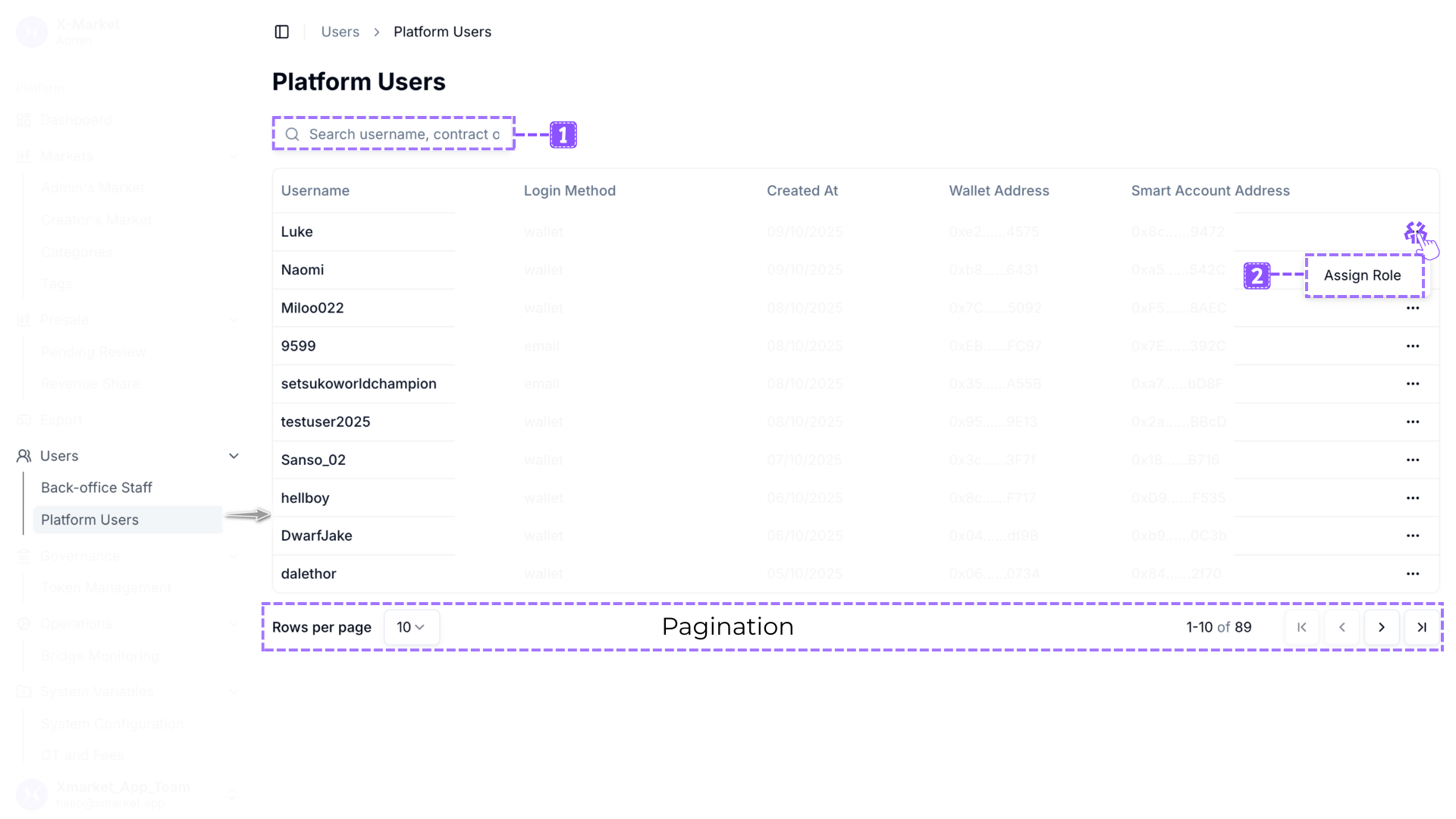
| 1 | Locate Search Field | Find the "Search username, contract or wallet address..." textbox at the top of the page. |
| 2 | Enter Search Term | Type the username, contract address, or wallet address you want to find. |
| 3 | View Filtered Results | The table updates automatically to show only users matching your search criteria. |
| 4 | Review Matches | Examine the filtered results to find the specific user you need. |
| 5 | Clear Search | Delete the text from the search field to return to viewing all users. |
Search Capabilities
| Search Type | Format | Example |
|---|---|---|
| Username Search | Full or partial username | "9599", "testuser", "hellboy" |
| Wallet Address Search | Full or partial wallet address | "0xEB......FC97", "0xEB" |
| Smart Account Search | Full or partial smart account address | "0x7E......392C", "0x7E" |
Search Behavior
| Behavior | Description |
|---|---|
| Real Time Filtering | The table updates dynamically as you type, providing instant feedback on search results. |
| Multi Field Search | The search field queries across username, wallet address, and smart account address simultaneously. |
| Partial Matching | You can search using partial strings to find users when you don't know the complete username or address. |
| No Results Display | When no users match your search, the table shows "No results." message. |
| Pagination Updates | The pagination indicator updates to show the count of filtered results. |
2. Role Assignment Function
Role Assignment Access Sequence
| Step | Action | Details |
|---|---|---|
| 1 | Locate User | Find the user you want to assign a role to in the Platform Users table. |
| 2 | Click Edit Item | Click the Edit item button (three dots icon) in the Actions column for the selected user. |
| 3 | Select Assign Role | A dropdown menu appears. Click Assign Role. |
| 4 | Open Assignment Dialog | The "Assign Role" dialog appears showing the user's initial and username. |
| 5 | View Available Roles | The dialog displays buttons for all available roles in the system. |
Role Selection Sequence
| Step | Action | Details |
|---|---|---|
| 1 | Review User Identity | Verify the user initial and username displayed at the top of the dialog. |
| 2 | Review Available Roles | See the five role buttons: Huula Ops Team, Treasury Ops, Admin, Operator, Super admin. |
| 3 | Select Role | Click the button for the role you want to assign to this user. |
| 4 | Verify Selection | The selected role button is highlighted and the Assign Role button becomes enabled. |
| 5 | Confirm Assignment | Click the Assign Role button to apply the role to the user. |
| 6 | Cancel Assignment | Click Cancel or Close to exit without assigning a role. |
Available Roles for Assignment Examples:
| Role Button | Permissions | Typical Use Case |
|---|---|---|
| Huula Ops Team | 1 permission | Operational team members with limited market management (excludes fee settings and withdrawal approval). |
| Treasury Ops | 2 permissions | Treasury and financial operations management. |
| Admin | 14 permissions | Mid level administrators with user management and most platform functions. |
| Operator | 7 permissions | Day to day operational staff handling standard market tasks. |
| Super admin | 21 permissions | Full system administrators with complete access to all platform functions. |
Role Assignment Dialog Behavior
| Behavior | Description |
|---|---|
| User Identification | Dialog displays user's first initial as an avatar (e.g., "M" for Miloo022) along with full username. |
| Single Selection | You can only select one role at a time. Clicking a new role button deselects the previous selection. |
| Disabled Until Selection | The Assign Role button remains disabled until you select a role from the available options. |
| Enabled After Selection | Once a role is selected, the Assign Role button becomes active and clickable. |
| Immediate Effect | Assigning a role grants the user all associated permissions immediately upon confirmation. |
3. Address Display Format
Wallet Address Format
| Format Element | Description | Example |
|---|---|---|
| Prefix | First 4 characters of the blockchain address including "0x". | 0x7C |
| Ellipsis | Six dots indicating truncated middle portion of the address. | ...... |
| Suffix | Last 4 characters of the blockchain address. | 5092 |
| Complete Format | Shortened display for readability while maintaining uniqueness. | 0x7C......5092 |
Smart Account Address Format
| Format Element | Description | Example |
|---|---|---|
| Prefix | First 4 characters of the smart account address including "0x". | 0xF5 |
| Ellipsis | Six dots indicating truncated middle portion of the address. | ...... |
| Suffix | Last 4 characters of the smart account address. | 8AEC |
| Complete Format | Shortened display for readability while maintaining uniqueness. | 0xF5......8AEC |
Address Display Purpose
| Purpose | Description |
|---|---|
| Space Efficiency | Truncated format allows full addresses to fit in table columns without horizontal scrolling. |
| Readability | Shorter format is easier to scan and compare visually than full 42 character addresses. |
| Uniqueness Preservation | First and last 4 characters typically provide enough information to uniquely identify addresses. |
4. Platform Users Viewing Function
Users List Viewing Sequence
| Step | Action | Details |
|---|---|---|
| 1 | Access Platform Users | Navigate to Users > Platform Users from the main navigation menu. |
| 2 | View Page Header | Review the page title "Platform Users" at the top of the page. |
| 3 | View Users Table | Review the table displaying all registered platform users with their account details. |
| 4 | Review User Information | Each row shows Username, Login Method, Created At, Wallet Address, Smart Account Address, and Actions. |
| 5 | Check Total Users | View the pagination indicator (e.g., "1 to 10 of 87") to see the total number of registered users. |
Users Table Columns
| Column | Description |
|---|---|
| Username | The unique username chosen by the user when registering on the platform. |
| Login Method | The authentication method used by the user: "wallet" for Web3 wallet connection or "email" for email based authentication. |
| Created At | Date when the user account was created, displayed in DD/MM/YYYY format. |
| Wallet Address | The user's blockchain wallet address in truncated format (e.g., "0x7C......5092"). |
| Smart Account Address | The user's smart contract account address in truncated format (e.g., "0xF5......8AEC"). |
| Actions | Edit item button (three dots icon) providing access to user management options. |
5. User Account Information Examples:
Account Creation Dates
| Sample Users | Created At | Login Method | Pattern |
|---|---|---|---|
| Miloo022 | 08/10/2025 | wallet | Recent registration |
| 9599 | 08/10/2025 | Recent registration | |
| setsukoworldchampion | 08/10/2025 | Recent registration | |
| testuser2025 | 08/10/2025 | wallet | Recent registration |
| Sanso_02 | 07/10/2025 | wallet | Recent registration |
| hellboy | 06/10/2025 | wallet | Mid October registration |
| DwarfJake | 06/10/2025 | wallet | Mid October registration |
| dalethor | 05/10/2025 | wallet | Early October registration |
| luci | 04/10/2025 | wallet | Early October registration |
| kds6254 | 02/10/2025 | wallet | Early October registration |
Login Method Distribution
| Observation | Details |
|---|---|
| Wallet Dominant | Majority of observed users authenticate via Web3 wallet connection. |
| Email Alternative | Email authentication provides access for users without cryptocurrency wallets. |
| Mixed Ecosystem | Platform supports both crypto native users (wallet) and mainstream users (email). |
Overview
Back-office staff must be assigned the permission key to access and whitelisted to operate market.
| No. | Key Features | Permission Key | Whitelist Type |
|---|---|---|---|
| 1 | User Search | platform_users | - |
| 2 | Role Assignment | platform_users | - |
| 3 | Users List Viewing | platform_users | - |
User Search Function
| Step | Instruction |
|---|---|
| 1 | Locate the "Search username, contract or wallet address..." field at the top of the page. |
| 2 | Type the username you want to find (e.g., "9599", "testuser2025"). |
| 3 | The table filters automatically to show only matching users. |
| 4 | Alternatively, search by wallet address (e.g., "0xEB......FC97") or smart account address. |
| 5 | The pagination indicator updates to show filtered count (e.g., "1 to 1 of 1"). |
| 6 | Clear the search field to return to viewing all users. |
Role Assignment Function
| Step | Instruction |
|---|---|
| 1 | Locate the user you want to assign a role to in the Platform Users table. |
| 2 | Click the Edit item button (three dots icon) in the Actions column for that user. |
| 3 | From the dropdown menu, click Assign Role. |
| 4 | The Assign Role dialog opens showing the user's initial (e.g., "M") and full username (e.g., "Miloo022"). |
| 5 | Review the five available role buttons: Huula Ops Team, Treasury Ops, Admin, Operator, Super admin. |
| 6 | Click the role button that matches the level of access this user should have. |
| 7 | The Assign Role button at the bottom becomes enabled after selection. |
| 8 | Click Assign Role to grant the selected role to the user. |
| 9 | Click Cancel or Close to exit without assigning a role. |
| 10 | Upon successful assignment, the user gains all permissions associated with the selected role. |
Best Practices for Platform Users
| Practice | Description |
|---|---|
| Verify User Identity Before Role Assignment | Always confirm you have the correct user by checking username and wallet address before assigning powerful roles like Admin or Super admin. |
| Follow Least Privilege Principle | Assign the minimum role necessary for users to perform their intended functions. Start with Operator for basic users, only escalating to Admin or Super admin when required. |
| Use Search for Efficiency | When managing specific users, use the search function rather than manually browsing through all 87 users across multiple pages. |
| Search by Wallet Address for Verification | When users report issues, search by their wallet address to ensure you're viewing the correct account, as usernames may be similar. |
| Document Role Assignments | Maintain external records of which users have been assigned which roles for auditing and security review purposes. |
| Regular Access Reviews | Periodically review users with elevated roles (Admin, Super admin) to ensure access remains appropriate to their current responsibilities. |
| Understand Login Method Implications | Recognize that wallet users control their own keys while email users rely on platform managed accounts, affecting security considerations. |
| Monitor New User Registrations | Regularly check the Created At column to identify new users and determine if they require role assignments for platform contribution. |
| Test Role Assignments | When unsure about appropriate role level, start with lower permissions and escalate only after verifying user needs. |
| Address Format Awareness | Understand that displayed addresses are truncated; use search or detail views when you need to verify complete addresses. |
Product Glossary
| Term | Description |
|---|---|
| Platform Users | All users registered on the X Market platform who can trade, create markets, and participate in platform activities. |
| Platform Users Management | The administrative interface for viewing platform users, searching user records, and assigning roles to grant permissions. |
| Username | The unique identifier chosen by a user during registration, displayed throughout the platform to identify the user. |
| Login Method | The authentication mechanism a user employs to access their account, either "wallet" for Web3 wallet connection or "email" for email based authentication. |
| Wallet Login | Authentication method where users connect their external cryptocurrency wallet (e.g., MetaMask, WalletConnect) to access the platform. |
| Email Login | Authentication method where users register and sign in using an email address and password or verification link. |
| Created At | The date when a user account was first registered on the platform, displayed in DD/MM/YYYY format. |
| Wallet Address | The blockchain address associated with a user's account, used for cryptocurrency transactions and smart contract interactions. |
| Smart Account Address | The smart contract account address that manages the user's on chain activities and positions on the platform. |
| Truncated Address Format | Shortened display of blockchain addresses showing first 4 characters (including 0x), six dots, and last 4 characters (e.g., 0x7C......5092). |
| Full Address | Complete 42 character blockchain address in hexadecimal format starting with "0x" (e.g., 0x7C1234567890abcdef1234567890abcdef125092). |
| 0x Prefix | The standard prefix for Ethereum blockchain addresses indicating hexadecimal format. |
| Actions Column | The rightmost column in the users table containing the Edit item button for accessing user management options. |
| Edit Item Button | Action button represented by three dots (⋮) that opens a context menu with user management options. |
| Assign Role | Feature allowing administrators to grant permission sets to users by assigning them predefined roles. |
| Assign Role Dialog | Modal window for selecting and assigning a role to a specific platform user. |
| User Initial | First letter of username displayed as an avatar in the Assign Role dialog (e.g., "M" for Miloo022). |
| Role Button | Clickable button in the Assign Role dialog representing an available role that can be assigned to the user. |
| Huula Ops Team Role | Limited operational role with 1 permission for market activities, excluding fee settings and withdrawal approval. |
| Treasury Ops Role | Specialized role with 2 permissions focused on treasury and financial management operations. |
| Admin Role | Mid level administrative role with 14 permissions including user management and most platform functions. |
| Operator Role | Operational role with 7 permissions for handling day to day market tasks and standard operations. |
| Super admin Role | Highest level role with all 21 permissions providing complete access to all system functions and settings. |
| Search Field | Text input field at the top of the page for filtering users by username, contract address, or wallet address. |
| Search Placeholder | Instructional text in search field reading "Search username, contract or wallet address..." to guide search usage. |
| Real Time Filtering | Search functionality that updates table results dynamically as keywords are typed without requiring submission. |
| Multi Field Search | Search capability that queries across multiple fields (username, wallet address, smart account address) simultaneously. |
| No Results Message | Table message displayed when search or filter criteria return no matching users. |
| Users Table | The main data table displaying all registered platform users with their account information and management options. |
| Total User Count | The total number of registered platform users, displayed in the pagination indicator (e.g., 87 users). |
| Web3 Wallet | Cryptocurrency wallet software that users connect to authenticate and interact with blockchain features (e.g., MetaMask, Trust Wallet). |
| External Wallet | Blockchain wallet controlled by the user through their own private keys, connected via wallet login method. |
| Platform Managed Wallet | Wallet created and maintained by the platform for users who register via email login method. |
| Blockchain Address | Unique identifier on the blockchain network associated with a wallet or smart account. |
| Smart Contract Account | Programmable blockchain account that enables advanced features like gasless transactions and account recovery. |
| Hexadecimal Format | Base 16 numbering system used for blockchain addresses, using digits 0 to 9 and letters A to F. |
| Cancel Button | Action button in the Assign Role dialog that closes the dialog without assigning a role. |
| Close Button | Action button in the Assign Role dialog that exits without saving changes. |
| Assign Role Button | Confirmation button in the Assign Role dialog that applies the selected role to the user. Initially disabled until a role is selected. |
| Save Button | Alternative confirmation button in dialogs for applying changes. |
| Enabled Button State | Button state where the button is clickable and can be activated after required conditions are met. |
| Disabled Button State | Button state where the button is grayed out and cannot be clicked because required conditions are not met. |
| Context Menu | Dropdown menu that appears when clicking the Edit item button, showing available actions for the user. |
| Permission Grant | The immediate granting of access rights and capabilities when a role is assigned to a user. |
| User Avatar | Visual representation of user identity, displayed as first letter initial in dialogs (e.g., "M" for Miloo022). |
| Registration Date | The date a user created their account on the platform, recorded in Created At column. |
| Account Authentication | The process of verifying user identity through wallet connection or email credentials. |
| Breadcrumb | Navigation element at the top of the page showing current location: Users > Platform Users. |